


AI for Marketing: The Beginner's Guide (2026)

A lot of marketing advice about AI falls into one of two camps. Either it's breathless — "AI will 10x your marketing overnight" — or it's dismissive — "AI-generated content is garbage, don't bother." Neither one is particularly useful if you're actually trying to run a business or a marketing function day to day.
The honest answer sits in between. AI has become a genuinely useful part of a modern marketing workflow — for drafting, researching, repurposing, and scheduling — while remaining clearly limited at the parts of marketing that require real judgment: positioning, creative direction, and strategy. Understanding exactly where that line sits is the difference between using AI well and either underusing it or over-trusting it.
This guide exists to draw that line clearly. Beginners often misunderstand AI marketing in one of two directions — either assuming it can run their entire marketing function unsupervised, or assuming it's just a novelty that produces generic junk. Both are wrong, and both lead to wasted time.
This is for you if you own a small business, work in marketing, freelance, run a startup, or just want to understand how AI actually fits into modern marketing — without assuming any technical background. By the end, you should be able to say: "I finally understand where AI genuinely helps my marketing, and where it doesn't."
Table of Contents
1. What Is AI Marketing?

To understand AI marketing, it helps to separate three things that get blurred together constantly.
Traditional marketing is manual: a person writes the copy, designs the graphic, schedules the post, and analyzes the results by hand.
Marketing automation is older technology that runs pre-set sequences without AI involved — send this email three days after signup, post this at 9am every Tuesday. It's automatic, but it's not smart; it follows a fixed rule regardless of context.
AI marketing adds an understanding layer to either of the above. Instead of just following a fixed schedule, AI can read a customer's behavior, draft content based on a description, or adjust messaging based on what's actually working — interpreting information rather than just repeating a rule.
Featured Definition — What is AI marketing? AI marketing is the use of artificial intelligence to assist with marketing tasks that require understanding or generating content — writing, research, personalization, and analysis — rather than simply automating a fixed, repetitive sequence. It doesn't replace a marketing strategy; it accelerates the execution of one.
A simple example

Say you're a coffee shop announcing a new seasonal drink.
Traditional marketing: You write an Instagram caption from scratch, design the graphic, and post it manually.
Marketing automation: The post is scheduled to publish automatically at a set time — but the content was still written and designed by hand.
AI marketing: You describe the drink to an AI tool, and it drafts three caption options and generates a graphic, which you review, tweak, and schedule.
Notice what didn't change in that last example: you're still the one deciding what to say and whether it's good. AI compressed the execution time, not the decision-making.
2. What AI Can Actually Help With

This is the practical core of the guide — where AI genuinely earns its place in a marketing workflow.
Content writing — Drafting blog posts, product descriptions, and website copy from an outline or rough idea, cutting first-draft time significantly.
Email marketing — Writing subject lines, drafting campaign copy, and personalizing messages at a scale that would be impractical to do manually for every segment.
Social media — Generating captions, repurposing one piece of content into multiple platform-specific posts, and suggesting posting times based on engagement patterns.
Ad copy — Producing multiple ad variations quickly for testing, rather than manually writing each version by hand.
SEO — Assisting with keyword research, content structure suggestions, and meta descriptions, though not replacing genuine topical expertise or link-building strategy.
Research — Summarizing competitor activity, industry trends, and audience insights faster than manual research across multiple sources.
Customer support — Drafting responses to common questions, freeing up time for a real person to handle nuanced or high-value conversations.
Analytics — Turning raw campaign numbers into a plain-English summary of what's working and what isn't, without requiring a dedicated analyst.
Personalization — Adjusting messaging based on customer segment or behavior, at a scale manual personalization can't match.
Automation — Connecting the "understanding" step (drafting, categorizing) to actual workflow triggers, so content moves through a pipeline with less manual handling.
Repurposing content — Turning one blog post, video, or podcast episode into a week's worth of social posts, email content, and short-form clips.
Brainstorming — Generating a batch of campaign ideas or angles to react to, instead of starting from a blank page.
Campaign planning — Drafting a rough campaign structure — timeline, channels, key messages — that a human then refines.
Lead nurturing — Drafting personalized follow-up sequences based on a lead's specific behavior or inquiry, rather than one generic template for everyone.
Reporting — Compiling performance data into a client-ready or team-ready summary automatically, instead of manually building a deck each month.
Quick Take: The common thread across all of these is execution speed, not strategic judgment. AI is strongest wherever the task is "produce a first version of something based on clear input" — and weakest wherever the task requires deciding what the input should be in the first place.
3. What AI Still Doesn't Do Well

This section matters as much as the last one — arguably more, because it's the part most "AI marketing" content skips entirely.
Original strategy AI can help execute a strategy once you've defined it, but it can't reliably originate one. It doesn't know your competitive landscape, your specific customers' unspoken frustrations, or which battles are worth fighting this quarter — that judgment still has to come from you.
Brand positioning Positioning requires a point of view — what you stand for, who you're explicitly not for, what makes your business different in a way that matters to your specific customer. AI tends to default to safe, broadly appealing language, which is close to the opposite of strong positioning.
Creative direction AI can generate options, but someone still has to decide which direction is actually right for the brand, and why. Left unsupervised, AI-generated creative tends toward generic, competent, forgettable — rarely distinctive.
Human relationships The trust that turns a first-time customer into a repeat one, or a cold lead into a client, is still overwhelmingly built through real human interaction. AI can support that relationship (drafting a thoughtful follow-up, remembering a detail) but it doesn't replace it.
Sales conversations Especially for higher-stakes or higher-cost purchases, a real conversation — reading tone, handling objections in real time, building genuine rapport — still outperforms AI-generated messaging.
Long-term business judgment Deciding whether to pivot a product line, enter a new market, or shift your entire marketing approach requires context, risk tolerance, and accountability that AI tools simply don't have.
Pro Tip: A useful mental model: AI is a strong first-draft machine and a weak decision-maker. Use it to produce options and drafts quickly, and keep the actual decisions — what to say, what to stand for, what to prioritize — with a human who understands the business.
4. Beginner-Friendly Examples

Here's what this looks like in practice, across ten different types of businesses. Time estimates are illustrative based on typical task volume, not a guaranteed outcome — your results depend on your specific workflow.
Restaurant Before: Manually writing daily specials posts and replying to reservation questions across platforms. After: AI drafts specials captions from a quick description; a chatbot-style tool answers routine hours and reservation questions. Estimated weekly time saved: 2–3 hours.
Law firm Before: Manually writing blog content explaining legal topics for potential clients. After: AI drafts plain-English first passes on common legal topics, reviewed and finalized by an attorney for accuracy. Estimated weekly time saved: 2–4 hours.
Marketing agency Before: Manually brainstorming campaign angles and building client reports from scratch each month. After: AI brainstorms options and drafts client report summaries from raw analytics data. Estimated weekly time saved: 4–6 hours.
Electrician Before: Writing occasional promotional posts and manually responding to inquiry messages. After: AI drafts quick promotional posts and inquiry responses, reviewed before sending. Estimated weekly time saved: 1–2 hours.
Real estate agent Before: Writing every listing description and social post individually. After: AI drafts listing copy and generates a batch of social posts from listing photos and details. Estimated weekly time saved: 3–5 hours.
Fitness coach Before: Manually writing weekly newsletter content and social captions. After: AI drafts newsletter and caption content from a rough outline of the week's focus. Estimated weekly time saved: 2–3 hours.
Online store Before: Writing every product description and ad variation manually. After: AI drafts product descriptions in bulk and generates multiple ad copy variations for testing. Estimated weekly time saved: 4–6 hours.
Consultant Before: Manually researching prospects and writing individualized outreach. After: AI researches prospect background quickly and drafts a personalized first outreach message. Estimated weekly time saved: 2–4 hours.
Nonprofit Before: Writing grant-adjacent content, newsletters, and donor updates entirely by hand. After: AI drafts newsletter and donor update content from bullet-point updates, freeing staff time for direct outreach. Estimated weekly time saved: 3–4 hours.
Coffee shop Before: Manually designing and writing every social post for daily specials and events. After: AI drafts captions and generates graphics from a quick product description. Estimated weekly time saved: 2–3 hours.
5. The Best AI Marketing Tools, Organized by Job

Rather than ranking these, here's what each one is actually good at — and where it isn't the right fit.

Problem: Blog posts, website copy, and product descriptions take real time to write well.
Why AI helps: Both tools turn an outline or rough idea into a structured first draft in minutes.
Strengths: Claude tends to produce more natural, less repetitive long-form writing; ChatGPT is a strong general-purpose alternative that also handles brainstorming and quick research in the same conversation.
Weaknesses: Both require real editing to sound like your brand rather than a generic AI voice — skipping that step is the single most common mistake in this guide.
Pricing: Free plans available on both; paid plans around $20/month.
Best for: Any business regularly producing blog content, web copy, or product descriptions.
Alternatives: Gemini, particularly for businesses already inside the Google ecosystem.
Real-world example: A fitness coach turns a rough voice memo about a new program into a polished landing page draft using Claude.

Problem: Producing consistent, platform-ready social content takes design skill and scheduling discipline most small teams don't have time for.
Why AI helps: Canva AI generates on-brand graphics from a description; Buffer's AI assistant drafts captions and repurposes long-form content into multiple platform-specific posts, then schedules everything automatically.
Strengths: Canva AI is genuinely beginner-friendly for design; Buffer's per-channel pricing (rather than per-user) is unusually fair for solo operators and small agencies managing several client accounts.
Weaknesses: Buffer's free plan caps you at 3 channels and a small scheduled-post queue, which active posters will outgrow quickly; Canva AI's caption writing is solid but not as sharp as a dedicated writing tool for longer captions.
Pricing: Canva: free plan available, Pro around $12–15/month. Buffer: free plan (3 channels); Essentials around $5/channel/month (annual); Team around $10/channel/month (annual).
Best for: Canva AI for design-heavy content; Buffer for scheduling and repurposing across multiple platforms and channels.
Alternatives: Later or Hootsuite for teams needing deeper social listening and analytics beyond what Buffer offers.
Real-world example: A coffee shop repurposes one product photo into a week of Instagram, Facebook, and Pinterest posts using Canva AI, then schedules the batch through Buffer.
Email Marketing: HubSpot AI

Problem: Writing individualized, relevant email campaigns for different customer segments is time-consuming at any real scale.
Why AI helps: HubSpot's AI features draft subject lines and email copy directly connected to your actual contact and campaign data, rather than generic templates.
Strengths: Because it's connected to your CRM, suggestions are grounded in real customer behavior and segment data, not guesswork.
Weaknesses: The AI-assisted marketing features live behind paid Marketing Hub tiers, which scale in cost by contact volume — this can be a significant jump from HubSpot's free CRM tier.
Pricing: Free CRM tier; Marketing Hub pricing varies substantially by contact volume and feature tier — confirm current numbers directly, as they shift often.
Best for: Businesses with an active email list and enough volume to justify a dedicated marketing platform.
Alternatives: ChatGPT or Claude for drafting email copy manually if you're not ready for a full marketing platform yet.
Real-world example: An online store uses HubSpot's AI-assisted subject line suggestions to test variations across a seasonal sale campaign.

Problem: Testing multiple ad variations requires writing several distinct versions of the same core message.
Why AI helps: Both tools can generate a batch of genuinely different angles quickly, rather than one version reworded slightly five times.
Strengths: Fast, cheap way to generate testable variations before committing ad spend.
Weaknesses: Neither tool actually places or manages the ads — you still need your ad platform (Meta, Google) for that half of the job, and neither has visibility into your live campaign performance unless you paste that data back in.
Pricing: Free plans available; paid around $20/month.
Best for: Marketers who need copy variations for A/B testing, not full campaign management.
Alternatives: HubSpot for businesses that want ad management and copy generation connected in one system.
Real-world example: A marketing agency generates five distinct ad copy angles for a client's product launch, then tests the top three in a live campaign.
SEO: Perplexity and ChatGPT

Problem: Keyword research and understanding what's currently ranking for a topic takes real time across multiple tools and tabs.
Why AI helps: Perplexity's cited, sourced answers are well suited to researching what's currently working for a topic; ChatGPT and Claude can help structure content around a target keyword and draft meta descriptions.
Strengths: Genuinely faster than manual research for understanding a competitive landscape or drafting on-page elements.
Weaknesses: None of these tools are a substitute for a dedicated SEO platform (like Ahrefs or SEMrush) for actual keyword volume data, backlink analysis, or rank tracking — they help with content and research, not technical SEO measurement.
Pricing: Perplexity: free plan, Pro around $20/month. ChatGPT/Claude: free plans, paid around $20/month.
Best for: Content-focused SEO work — research, structure, and drafting — not technical SEO auditing.
Alternatives: A dedicated SEO tool for keyword volume and rank tracking, used alongside AI for the actual content creation.
Real-world example: A consultant uses Perplexity to research what competitors are currently covering on a topic before drafting an original blog post with Claude.
Writing Polish: Grammarly AI

Problem: AI-drafted or human-drafted marketing copy still needs a pass for tone, clarity, and consistency before it goes out.
Why AI helps: Grammarly's AI features go beyond basic spelling and grammar to adjust tone and tighten unclear sentences.
Strengths: A genuinely useful final layer on top of any other writing tool in this guide, catching things a first AI draft or a rushed human draft both tend to miss.
Weaknesses: It's a polishing tool, not a content generator — it needs something to work with already.
Pricing: Free plan available; paid plans around $12–15/month.
Best for: Anyone publishing AI-assisted or human-drafted marketing content regularly.
Alternatives: None directly comparable — most competitors focus on grammar alone rather than tone and clarity together.
Real-world example: A nonprofit runs its donor newsletter draft through Grammarly for a final tone check before sending.
Video & Audio Content: Descript

Problem: Editing podcast episodes, video testimonials, or short-form video content is time-consuming without dedicated editing skill.
Why AI helps: Descript lets you edit audio and video by editing a text transcript, and can automatically generate short clips from longer content — useful for repurposing a podcast episode into social clips.
Strengths: Dramatically lowers the skill floor for video/audio editing, which matters for marketers without a dedicated editor on staff.
Weaknesses: Still requires some learning curve beyond pure text-based tools, and it's a specialized tool — not useful outside audio/video-based marketing.
Pricing: Free plan available with real functionality; paid plans vary by usage tier — confirm current pricing directly, as it's changed structure more than once recently.
Best for: Any business producing podcast, video testimonial, or short-form video content regularly.
Alternatives: Canva AI's basic video tools, for lighter, less frequent video editing needs.
Real-world example: A consultant turns a single recorded webinar into five short social clips using Descript's automatic highlight detection.
Presentations & Reporting: Gamma
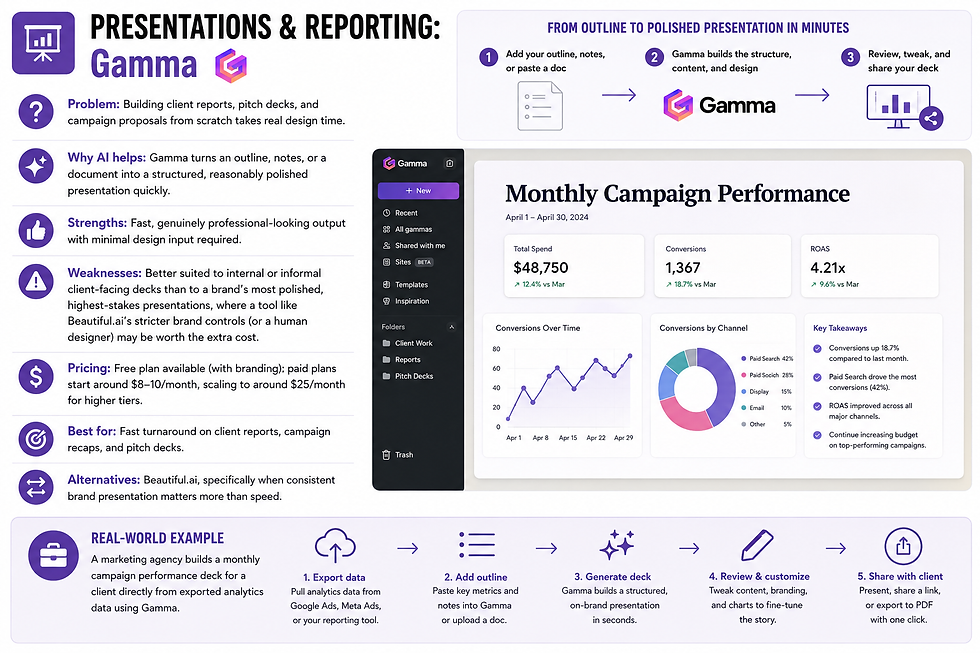
Problem: Building client reports, pitch decks, and campaign proposals from scratch takes real design time.
Why AI helps: Gamma turns an outline, notes, or a document into a structured, reasonably polished presentation quickly.
Strengths: Fast, genuinely professional-looking output with minimal design input required.
Weaknesses: Better suited to internal or informal client-facing decks than to a brand's most polished, highest-stakes presentations, where a tool like Beautiful.ai's stricter brand controls (or a human designer) may be worth the extra cost.
Pricing: Free plan available (with branding); paid plans start around $8–10/month, scaling to around $25/month for higher tiers.
Best for: Fast turnaround on client reports, campaign recaps, and pitch decks.
Alternatives: Beautiful.ai, specifically when consistent brand presentation matters more than speed.
Real-world example: A marketing agency builds a monthly campaign performance deck for a client directly from exported analytics data using Gamma.
Knowledge & Planning: Notion AI

Problem: Campaign plans, brand guidelines, and content calendars often live scattered across documents, spreadsheets, and someone's memory.
Why AI helps: If your marketing planning already lives in Notion, its AI features can search across existing content and answer planning questions directly.
Strengths: Useful for keeping a growing marketing team aligned around shared campaign plans and brand guidelines.
Weaknesses: Only pays off if your team already works inside Notion; current pricing requires the Business tier for full AI access, a meaningful cost step for a small team. Pricing: Business plan around $20/user/month for full AI features.
Best for: Marketing teams (not solo marketers) with an existing Notion-based workflow. Alternatives: A simpler shared document plus ChatGPT or Claude for ad hoc questions, for smaller or solo operations.
Real-world example: A growing agency's team uses Notion AI to quickly pull up a client's brand voice guidelines before drafting new content.

Problem: Manually moving content and data between your writing tool, scheduling tool, and CRM wastes real time across a busy week.
Why AI helps: These platforms connect your marketing tools together, with AI steps available for drafting, categorizing, or summarizing along the way.
Strengths: Zapier's guided builder is the easiest starting point for connecting two marketing tools for the first time; Make is a better fit once workflows involve more branching logic.
Weaknesses: Zapier's per-task pricing can climb quickly with regular use; Make has a steeper initial learning curve.
Pricing: Zapier: free plan, paid around $20/month. Make: free plan, generally lower cost than Zapier at comparable usage.
Best for: Connecting your content, scheduling, and CRM tools into a single automated pipeline.
Alternatives: n8n, for teams comfortable with more setup complexity in exchange for lower long-term cost.
Real-world example: A real estate agent's workflow automatically pulls a new listing's details into a content draft, then schedules the resulting social post once approved.
Quick comparison
Tool | Marketing Job | Free Plan | Starting Price |
ChatGPT | Writing, brainstorming, ad copy | Yes | ~$20/mo |
Claude | Long-form content, copy | Yes | ~$20/mo |
Canva AI | Social graphics, design | Yes | ~$12–15/mo |
Buffer | Social scheduling & repurposing | Yes (3 channels) | ~$5/channel/mo |
HubSpot AI | Email marketing, CRM-connected copy | Yes (CRM only) | Varies by tier |
Perplexity | SEO & competitive research | Yes | ~$20/mo |
Grammarly AI | Tone and clarity polish | Yes | ~$12–15/mo |
Descript | Video/audio editing & repurposing | Yes | Varies by tier |
Gamma | Presentations & client reports | Yes | ~$8–10/mo |
Notion AI | Team planning & knowledge base | No (Business only) | ~$20/user/mo |
Zapier | Connecting marketing tools | Yes | ~$20/mo |
Make | Complex marketing automations | Yes | Lower than Zapier at scale |
6. An AI Marketing Workflow, Start to Finish

Here's how several of these tools realistically connect in a single campaign, from idea to results.
Idea — Start with a rough concept: a seasonal promotion, a new product, a topic your audience keeps asking about.
Research — Use Perplexity to quickly understand what's currently working for competitors or similar campaigns, with sources you can verify.
Outline — Ask ChatGPT or Claude to structure a rough outline for the core piece of content — a blog post, landing page, or campaign centerpiece.
Writing — Draft the full piece with Claude or ChatGPT, then run it through Grammarly for a final tone and clarity pass.
Images — Generate supporting graphics with Canva AI, matched to your brand colors and style.
Email — Draft the campaign email in HubSpot (or ChatGPT if you're not on a full marketing platform), tailored to your actual segments.
Social — Repurpose the core content into platform-specific posts using Buffer's AI assistant, drawing from the same central piece of content.
Scheduling — Queue everything — email send times, social posts — through Buffer and your email platform, rather than publishing manually one piece at a time.
Analytics — After the campaign runs, pull performance data and ask ChatGPT or Claude to summarize what worked and what didn't in plain language.
Optimization — Use that summary to adjust your next campaign's approach — a stronger subject line, a different posting time, a different angle — closing the loop.
Quick Take: Notice that a human is making the actual decisions at every single step — what to research, what angle to take, which draft to approve, what the data actually means for next time. AI is doing the execution at each step; the judgment stays with you.
7. Common Mistakes
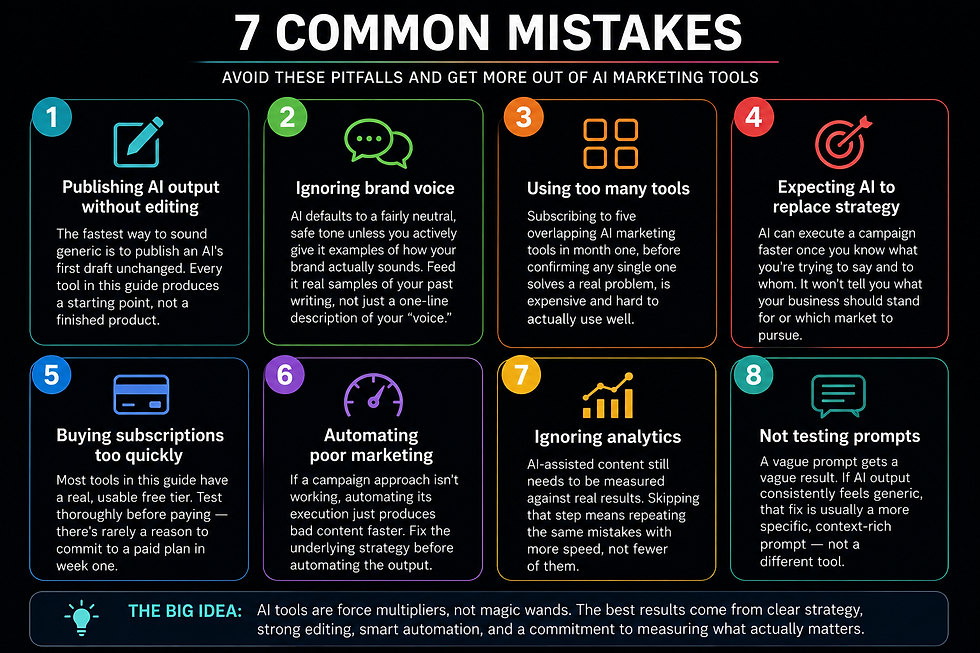
Publishing AI output without editing The fastest way to sound generic is to publish an AI's first draft unchanged. Every tool in this guide produces a starting point, not a finished product.
Ignoring brand voice AI defaults to a fairly neutral, safe tone unless you actively give it examples of how your brand actually sounds. Feed it real samples of your past writing, not just a one-line description of your "voice."
Using too many tools Subscribing to five overlapping AI marketing tools in month one, before confirming any single one solves a real problem, is expensive and hard to actually use well.
Expecting AI to replace strategy AI can execute a campaign faster once you know what you're trying to say and to whom. It won't tell you what your business should stand for or which market to pursue.
Buying subscriptions too quickly Most tools in this guide have a real, usable free tier. Test thoroughly before paying — there's rarely a reason to commit to a paid plan in week one.
Automating poor marketing If a campaign approach isn't working, automating its execution just produces bad content faster. Fix the underlying strategy before automating the output.
Ignoring analytics AI-assisted content still needs to be measured against real results. Skipping that step means repeating the same mistakes with more speed, not fewer of them.
Not testing prompts A vague prompt gets a vague result. If AI output consistently feels generic, the fix is usually a more specific, context-rich prompt — not a different tool.
Common Mistake Callout: The single most avoidable failure in AI marketing isn't a bad tool choice — it's treating the first draft as the final product. Build a habit of reviewing and editing every time, without exception, especially for anything customer-facing.
8. Frequently Asked Questions

What is AI marketing? AI marketing is the use of artificial intelligence to assist with tasks that require understanding or generating content — writing, research, personalization, and analysis — rather than simply automating a fixed, repetitive sequence. It accelerates the execution of a marketing strategy; it doesn't create the strategy itself.
Can AI replace marketers? Not entirely, and probably not for a long time. AI is strong at executing well-defined tasks quickly — drafting, repurposing, summarizing — but weak at the strategic judgment, brand positioning, and relationship-building that make marketing actually work. Most marketers who use AI well are using it to remove repetitive work, not to replace their own judgment.
Is AI marketing free? Many of the core tools have genuinely usable free tiers — ChatGPT, Claude, Canva, Buffer, Perplexity, and Grammarly all offer real functionality at no cost. Costs typically become meaningful once you need higher usage volume or more advanced features tied to a full marketing platform.
Is AI good for SEO? AI is useful for the content side of SEO — research, structure, and drafting — but it isn't a substitute for a dedicated SEO platform for keyword volume data, backlink analysis, or rank tracking. Combine both for the best results.
Can AI create ads? AI can draft ad copy and generate multiple variations quickly for testing, but it doesn't place, manage, or optimize live ad spend on its own — that still requires your ad platform and human oversight.
Can AI write blog posts? Yes, and this is one of AI's strongest use cases — turning an outline or rough idea into a structured first draft quickly. That draft still needs editing for accuracy, brand voice, and originality before publishing.
Can AI manage social media? AI can draft captions, generate graphics, and repurpose content across platforms, and tools like Buffer can schedule that content automatically. It's more accurate to say AI assists social media management than that it fully manages it — human review of tone and timing still matters.
Can AI improve email marketing? Yes, particularly for drafting subject lines and campaign copy tailored to specific customer segments, especially when connected to real CRM data through a tool like HubSpot.
Which AI tool is best for marketing? There's no single best tool — it depends on the job. Claude or ChatGPT for writing, Canva AI for design, Buffer for social scheduling, HubSpot for CRM-connected email, and Perplexity for research all serve different, specific needs.
Is AI-generated marketing content legal? Generally yes, but with caveats. Avoid using copyrighted material, real people's likenesses, or misleading claims in AI-generated content, and check platform-specific terms of service for commercial use, which vary by tool.
Do I need to disclose AI-generated content to customers? There's no universal legal requirement in most contexts as of this writing, though this is an evolving area, and some platforms or industries have specific disclosure rules. When in doubt, check current regulations relevant to your industry and location.
How much time can AI actually save in marketing? It varies by business type and content volume, but the examples in this guide suggest a realistic range of 2–6 hours saved per week for most small businesses, depending on how much repetitive writing and design work they handle.
What's the difference between AI marketing and marketing automation? Marketing automation runs pre-set sequences without understanding content — send this email on day three, post this at a fixed time. AI marketing adds an understanding layer, interpreting content or behavior rather than just following a fixed rule.
Can small businesses realistically use AI marketing without a big budget? Yes. Most of the tools in this guide have functional free tiers, and even paid plans typically start under $20/month — a small business can build a genuinely useful AI marketing stack without a significant budget.
What should I look for when choosing an AI marketing tool? Start from the specific problem you're solving, not the tool's popularity. Confirm the free tier actually lets you test real value, check how pricing scales as you grow (per contact, per channel, per seat), and verify the tool integrates with what you already use before committing to a subscription.
9. Final Recommendations

Best free tool: ChatGPT or Claude — both offer genuinely useful free tiers for drafting, brainstorming, and planning without any cost commitment.
Best overall: Claude — the strongest balance of writing quality and versatility across the content-heavy parts of a typical marketing workflow.
Best for content: Claude, particularly for longer-form writing that needs to sound natural rather than obviously AI-generated.
Best for social media: Buffer, for its fair per-channel pricing and genuinely useful AI repurposing features, paired with Canva AI for the design side.
Best for email: HubSpot AI, specifically once you have enough contact volume and segmentation needs to justify a full marketing platform.
Best for automation: Zapier for a first automation connecting your marketing tools; Make once your workflows grow more complex.
Best value: Buffer — a real free tier and fair, predictable per-channel pricing that scales sensibly for solo marketers and small agencies alike.
Best all-in-one: HubSpot — the closest thing in this guide to a single platform covering email, CRM, and content together, provided the pricing fits your contact volume.
Who should avoid AI marketing (for now): Businesses without a defined brand voice or basic marketing strategy yet. AI accelerates execution — if there's no clear message or positioning to execute, AI tools will just produce polished, generic content faster. Nail down what you actually want to say first; the tools in this guide will still be here once you have.
Closing Thought

The marketers getting real value from AI in 2026 aren't the ones who handed their entire strategy over to a chatbot. They're the ones who kept the thinking — the positioning, the voice, the judgment calls — firmly in human hands, and used AI specifically to speed up everything downstream of those decisions.
Start with the one part of your marketing workflow that eats the most time every week. That's usually the clearest place for AI to make an immediate, measurable difference — everything else in this guide is here for when you're ready to expand from there.


Comments