


AWeber vs. Mailchimp (2026): Which Is Better?

Updated: Oct 12

AWeber and Mailchimp both send email. That's about where the similarity ends once you start using them seriously.
AWeber is built around simplicity: straightforward email marketing, a short learning curve, and human support that's easy to reach. It's aimed at creators, bloggers, solopreneurs, and small businesses.
Mailchimp is a broader marketing platform. It offers deeper segmentation and automation, a bigger focus on ecommerce data, and more reporting, but its pricing and plan structure are more complicated, and a lot of the good features sit behind the higher tiers.
Neither one is the universal winner. The right pick depends on what your list looks like, how complicated your campaigns will get, and how much you're willing to pay as you grow. This guide walks through each area side by side, using pricing and features checked against 2026 sources, so you can decide without wading through marketing pages.
A note on accuracy: Both companies change plans, limits, and prices often (AWeber raised prices in late 2024, and Mailchimp cut its free plan in 2026). The numbers below are our best verified snapshot. Always confirm on aweber.com/pricing and mailchimp.com/pricing before you buy.
Quick Verdict

Choose AWeber if:
You want email marketing without a steep learning curve
Your needs are mostly newsletters, welcome sequences, and lead magnets
Straightforward, tag-based automation is enough
You want support you can actually reach (chat and email around the clock on every plan, plus phone)
You're a blogger, creator, solopreneur, or small business
You want to promote affiliate offers without worrying about an industry-level ban
Choose Mailchimp if:
You need more sophisticated segmentation, including behavioral and predictive options
You want multi-step, branching automations
You sell online and want purchase data driving your campaigns (Shopify and WooCommerce especially)
You want a broader marketing toolkit and a large integration ecosystem
Your marketing is getting more complex and you're comfortable paying for the higher tiers
Both can do the basics well. The question is how far past the basics you plan to go.
AWeber vs. Mailchimp at a Glance

Category | AWeber | Mailchimp |
Best for | Creators, bloggers, solopreneurs, small businesses wanting simple email | Growing businesses and online stores needing deeper segmentation and automation |
Ease of use | Simpler, fewer menus | Friendly editor, but more features and plan gates to navigate |
Free option | Free plan: 500 subscribers, 3,000 emails/month, AWeber branding. 14-day trial on paid plans | Free plan: 250 contacts, 500 emails/month (250/day limit), Mailchimp branding. 14-day trial on paid plans |
Starting paid price | Lite from $15/mo ($12.50/mo billed annually) at 500 subscribers | Essentials from $13/mo at 500 contacts |
Automation | Tag-based automations; Lite caps at 3, Plus is unlimited | Customer Journey builder; Essentials limited to 4-step flows, Standard and Premium go far deeper with branching |
Segmentation | Tags and custom segments; Lite includes 1 custom segment, Plus is unlimited | Tags, groups, segments; advanced and predictive segmentation on Standard and up |
Templates | 600+ advertised, plus Smart Designer (builds a template from your site URL) | Template library plus AI-assisted design tools; counts vary by source |
Landing pages | Included; 1 on Free, 3 on Lite, unlimited on Plus | Included on all plans; templates are fairly basic |
Forms | Included | Included |
A/B testing | Paid plans (not Free) | Paid plans; multivariate testing on Premium |
Analytics | Basic on lower tiers, advanced reporting on Plus | Deeper reporting, with advanced and custom reports on higher tiers |
Integrations | Advertises 750+ | Advertises 300+ |
Ecommerce | Built-in basic selling tools; 1% (Lite) or 0.6% (Plus) fee on sales through AWeber | Stronger Shopify and WooCommerce data, abandoned cart, revenue reporting |
AI features | AI writing assistant, Smart Designer, AI signup form builder | Generative AI content, Creative Assistant, send-time optimization, predictive segmentation |
Customer support | 24/7 chat and email on all plans, phone support | 24/7 email and chat on paid plans; limited on Free; phone on Premium |
Overall complexity | Lower | Higher |
What Is AWeber?

AWeber has been around since 1998 and is often credited with popularizing the email autoresponder. It's aimed squarely at small businesses, entrepreneurs, and content creators who want to grow a list and email it reliably.
Its core toolkit covers email broadcasts and newsletters, automated sequences, signup forms, landing pages, and subscriber management through tags and segments. The philosophy is simple: give people the tools most small senders actually need, keep them easy to find, and back them up with human support.
AWeber is not trying to be a full marketing suite. If you want a CRM, advanced ecommerce analytics, or complex branching journeys, you'll feel its limits. If you want to send good email consistently, you probably won't.
What Is Mailchimp?

Mailchimp started as a simple newsletter tool and grew into a wider marketing platform, now owned by Intuit. Email is still the center, but it sits alongside automation journeys, landing pages, forms, SMS, ecommerce data, reporting, and AI tools.
That breadth is the draw. Mailchimp can pull in purchase data from stores like Shopify and WooCommerce and use it to power segments and automations. It's also the more polished option for teams that want deeper analytics.
The tradeoff is complexity. Pricing is based on contacts, features are split across four plans, and some of the things people assume are standard (multi-step automation, advanced segmentation) only unlock on higher tiers.
Ease of Use

Both platforms are approachable. The difference is how much you have to learn before you get something useful out the door.
AWeber keeps the path short. You set up an account, build or import a list, pick a template, and send. Automations are built around tags and simple triggers, which makes sense quickly. There's less to configure, and fewer places to get lost.
Mailchimp has a friendly, modern editor and is easy to start with, but the more you use it, the more choices appear: audiences, tags, groups, segments, journeys, and settings that behave differently depending on your plan. It's very capable. It's also more to take in.
For a complete beginner who mainly wants to send newsletters and a welcome sequence, AWeber is usually the shorter path. For someone who already knows what they want from segmentation and automation, Mailchimp's extra depth is a feature rather than clutter.
[AUTHOR TEST OPPORTUNITY: Time how long it takes to set up an account, import 50 contacts, and send a first email on each platform, and note where you got stuck.]
Email Editor and Campaign Creation

Both offer drag-and-drop editors with content blocks, branding controls, mobile-responsive output, and the ability to save and reuse designs. Advanced users can work with custom HTML on both.
AWeber's standout shortcuts are its Smart Designer, which builds a branded template from your website URL, and its Canva integration for graphics. The workflow for routine newsletters is quick: pick a template, drop in content, send.
Mailchimp's editor is often praised as one of the more polished, with a deep block library (text, image, button, social, video, product) and AI-assisted design suggestions based on your brand assets. If you want more design control, it generally gives you more room to work.
For routine weekly newsletters, either is fast. For more custom, branded, design-heavy emails, Mailchimp tends to have the edge. For quickly turning your existing site's look into a template, AWeber's Smart Designer is a handy shortcut.
Email Templates and Design

AWeber advertises 600+ templates, while Mailchimp's library is smaller by most counts (though sources disagree on exact numbers, so we're not going to crown a winner on template count alone).
What matters more:
Quality and modern look: Both offer clean, responsive designs. Mailchimp's feel a little more polished to some reviewers; AWeber's are practical and plentiful.
Customization: Both let you change colors, fonts, layouts, and content blocks, and both support saving custom templates (on Mailchimp, check your plan, since the Free plan restricts this).
Branding: Free plans on both add the company's branding to your emails. On AWeber, removing it requires a paid plan.
A bigger library gives you more starting points, but most people end up customizing one or two templates and reusing them. Pick the editor you enjoy using.
Email Automation

This is where the two platforms really separate, and it's worth being specific about who actually needs the difference.
AWeber

AWeber's automations are tag-based and trigger-driven. Typical uses include a welcome series when someone subscribes, a lead magnet delivery, tag-based follow-ups, and simple nurture sequences. Lite allows 3 automations; Plus removes the cap and adds more advanced options such as behavioral triggers.
It's reliable and easy to build. It's also less sophisticated than dedicated automation platforms, so complex conditional branching isn't its strength.

Mailchimp's Customer Journey builder lets you build visual, multi-step flows with triggers, conditions, and branching. But the depth depends heavily on your plan:
Free: no real automation (a preview only)
Essentials: basic flows capped at 4 steps, which isn't enough for something like an abandoned-cart or re-engagement sequence
Standard and Premium: flows up to 200 steps with branching and more advanced options
Who actually needs the difference?

You probably only need Mailchimp's deeper automation if you:
Send different emails based on purchase behavior or browsing activity
Run abandoned-cart, post-purchase, and win-back sequences
Want branching paths (if they clicked, send this; if not, send that)
Manage multiple distinct customer journeys at once
If your automation is "welcome new subscribers, deliver the freebie, send a few nurture emails, then add them to the main newsletter," AWeber covers that comfortably, usually with less setup.
Segmentation and Personalization

Segmentation is simply sending the right message to the right slice of your audience instead of blasting everyone the same email. It's often the biggest lever on results once a list grows.
AWeber segments with tags and custom segments. Tags can be applied by sign-up form, link click, or automation, and you can then send to a tagged group. Lite includes 1 custom segment; Plus makes them unlimited and adds behavioral targeting.
Mailchimp gives you tags, groups, and segments, with basic segmentation available broadly. Advanced options, such as filtering by purchase behavior, engagement, or predicted demographics, plus predictive segmentation, sit on Standard and Premium. Mailchimp also tends to offer more conditions you can combine when building a segment.
In practice: a blogger tagging subscribers by interest ("beginner," "wants affiliate tips") will find AWeber's tags perfectly workable. A store sending different offers to first-time buyers, repeat customers, and lapsed shoppers will get more out of Mailchimp, particularly if Shopify or WooCommerce data is feeding it.
Landing Pages and Signup Forms

Both platforms include signup forms and a landing page builder, which is enough for basic lead capture.
AWeber: forms plus landing pages (1 on Free, 3 on Lite, unlimited on Plus). New subscribers can be tagged automatically so they land in the right sequence.
Mailchimp: forms and landing pages on every plan, directly connected to your audience. Reviewers describe the landing page templates as fairly basic and the builder a little hard to find.
Neither is meant to replace a dedicated landing-page tool for serious conversion testing, and neither supports A/B testing on landing pages according to recent reviews. For a simple "enter your email, get the freebie" page, both do the job.
A/B Testing

Both support A/B testing on paid plans, not on their free plans.
AWeber: split testing of email variations (subject lines and content) on paid plans, with up to three variants in some descriptions.
Mailchimp: A/B testing on paid plans covering things like subject lines, content, send time, and from name; multivariate testing and send-time optimization sit on higher tiers (Premium for multivariate).
Check your specific plan before assuming a testing feature is included, since both companies adjust what's available where.
Deliverability

Deliverability means whether your emails actually land in the inbox rather than spam. It's the part everyone cares about and nobody can fully promise.
Here's the honest version: inbox placement depends more on you than on the software. The platform matters, but your sending practices matter more.
What actually drives it:
Authentication. Set up SPF, DKIM, and DMARC for your sending domain. Major mailbox providers like Gmail and Yahoo have required these (plus easy unsubscribe and low spam complaint rates) for bulk senders since 2024.
Sender reputation. Consistency, engagement, and low complaint rates build it over time.
List hygiene. Remove bounces and long-term non-openers; never buy lists.
Spam complaints. Keep them very low by only emailing people who asked for it.
Content and engagement. People opening and clicking tells mailbox providers your email is wanted.
On the platform question, independent testing exists but isn't conclusive. Third-party testers have rated both services across different rounds and the results have varied by test and date: one tester's comparison rated Mailchimp's deliverability higher than AWeber's, while other reviewers have placed AWeber among the stronger performers in their own rounds. Vendor claims of "99% deliverability" are marketing, not proof. We're not going to name a deliverability winner, because the evidence doesn't support doing so cleanly.
Whichever you pick, authenticate your domain and keep your list clean. That does more than switching platforms ever will.
Integrations

Both connect to the tools most small businesses use. AWeber advertises 750+ integrations; Mailchimp advertises 300+. Both also connect through Zapier, which stretches either one much further.
Raw count isn't the whole story:
AWeber covers WordPress, major CRMs, lead generation tools, payment tools, and ecommerce platforms. For a typical blogger or small business, it almost certainly connects to everything you need.
Mailchimp's integrations are strongest around ecommerce and data: Shopify, WooCommerce, Salesforce, Google Analytics, Canva, and more. It also now offers a first-party site tracking pixel covering Shopify, Wix, and WooCommerce, according to a recent review.
Mailchimp's integration depth matters most for larger or data-driven businesses where purchase and behavior data needs to flow into campaigns. For a creator with a WordPress blog and a payment processor, either will do.
[INTERNAL LINK: "Wix vs. WordPress for Small Business" → Wix vs. WordPress for Small Business, for readers choosing a website platform alongside an email tool]
Ecommerce

If you run an online store, this section probably decides it.
Mailchimp connects to Shopify and WooCommerce and pulls in customer records, product catalog data, and order history. That powers segments based on what people bought, abandoned-cart automations, product recommendations, and revenue reporting. It's one of the platform's strongest areas.
AWeber can sell digital products and basic items through its own tools (with a 1% fee on Lite and 0.6% on Plus on top of your payment processor's charges), and integrates with ecommerce platforms. But its ecommerce automation is thinner; competitors' comparisons note it lacks a pre-built abandoned-cart automation.
For a serious store where purchase behavior should drive your emails, Mailchimp is the more natural fit. For a creator selling a few digital products, AWeber can handle it. If you're running a large store, you may also want to look at ecommerce-specialist email tools rather than either of these.
[INTERNAL LINK: "Wix vs. WordPress for eCommerce" → Wix vs. WordPress for eCommerce]
AI Features in 2026
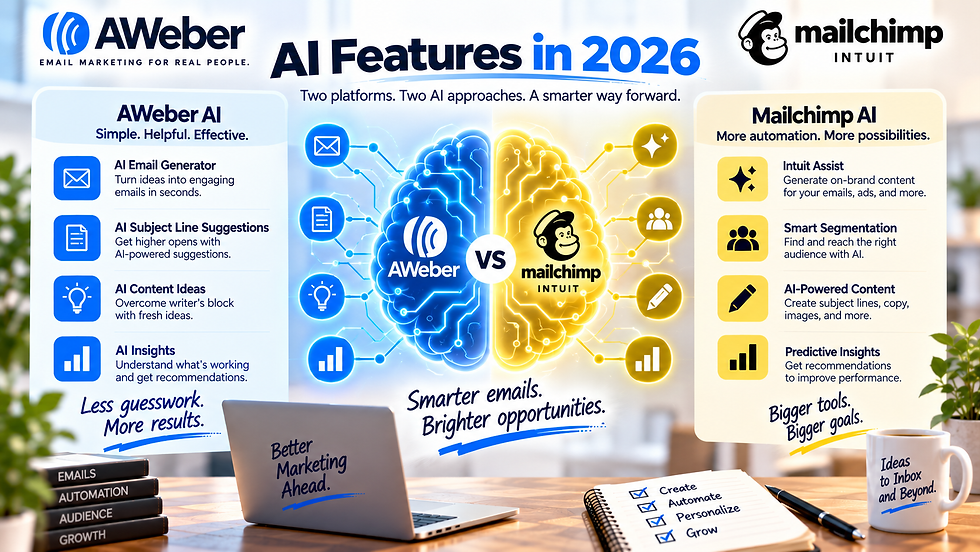
Both platforms have added AI, with different emphasis.
AWeber:
AI writing assistant for drafting email copy
Smart Designer, which uses your website to generate branded templates
An AI signup form builder
Integrations with ChatGPT and Claude, per a recent review
Mailchimp:
Generative AI for subject lines and copy
Creative Assistant for on-brand designs
Send-time optimization and predictive segmentation
Conversational AI reporting (Analytics AI, rolled out in 2026 per recent coverage)
AWeber's AI is aimed at removing blank-page friction for small senders. Mailchimp's goes further into data: predicting who to target and when. Whether that matters depends on your list size. If you have a few thousand subscribers, AI copy help is the useful part. If you have a large, data-rich list, predictive tools start to earn their keep.
AI features also change often, so check each company's current feature list rather than treating this as permanent.
Analytics and Reporting

Both give you the essentials: opens, clicks, unsubscribes, subscriber growth, and per-campaign performance.
AWeber's reporting is straightforward, with more advanced reporting and sales tracking reserved for Plus. Mailchimp goes deeper, with revenue reporting for connected stores, audience insights, and more advanced or custom reports on its higher plans.
For a typical small business, AWeber's reporting is enough to see what's working. For a more data-driven marketer who wants to tie email directly to revenue, Mailchimp provides more to work with.
One reminder: open rates have become less reliable since privacy changes to email apps, so lean on clicks and conversions when judging performance.
AWeber vs. Mailchimp Pricing in 2026
Both charge by list size, and both have changed their pricing recently, so this is where careful reading pays off.
Free plans
AWeber Free | Mailchimp Free | |
Subscribers/contacts | Up to 500 | Up to 250 |
Monthly emails | 3,000 | 500 (250 per day) |
Automation | 1 automation | None (preview only) |
Landing pages | 1 | Available, basic |
Branding | AWeber branding on emails | Mailchimp branding on emails |
Support | 24/7 chat and email reported | Email for 30 days, then limited help |
A couple of third-party sites claim AWeber has dropped its free plan. Most current sources, including pricing guides checked against AWeber's own page, show it remains, but confirm on aweber.com/pricing before relying on it.
Paid plans
AWeber:
Lite: from $15/mo ($12.50/mo billed annually) at 500 subscribers. Limits: 1 list, 3 automations, 3 landing pages, 1 custom segment, plus AWeber branding on some descriptions.
Plus: from $30/mo ($20/mo billed annually) at 500 subscribers. Unlimited lists, automations, landing pages, segments and users, branding removal, advanced reporting, behavioral targeting, and priority support.
Done For You: Plus features with AWeber setting up your account for you (setup fee reported at $79 by some sources, but other sources report different figures, so confirm).
Unlimited/High Volume: a flat $899/month for very large lists.
Mailchimp:
Essentials: from $13/mo at 500 contacts. 3 seats, basic flows (4 steps), A/B testing.
Standard: from $20/mo at 500 contacts. 5 seats, multi-step branching automation, advanced and predictive segmentation, send-time optimization.
Premium: from $350/mo (starting at 10,000 contacts). Unlimited seats, multivariate testing, phone support.
Send limits: Mailchimp caps monthly emails at 10x your contact tier on Essentials, 12x on Standard, and 15x on Premium. Several recent sources report AWeber applying similar caps (about 10x on Lite and 12x on Plus), though older materials describe unlimited sending, so confirm current limits.
What the list actually costs (monthly billing)
Contacts | AWeber Lite | AWeber Plus | Mailchimp Essentials | Mailchimp Standard |
500 | $15 | $30 | $13 | $20 |
1,000 | $25 | $45 | not verified | not verified |
2,500 | $35 | $55 | $45 | $60 |
5,000 | $60 | $90 | $75 | $100 |
10,000 | $100 | $135 | $110 | $135 |
Annual billing lowers AWeber's rates (roughly 17% off Lite and as much as 33% off Plus at the smallest tier). Figures are compiled from current third-party pricing guides and can vary by source and date; confirm exact quotes on each company's pricing page or calculator. Mailchimp's 1,000-contact price is left out because we couldn't verify it.
Mailchimp also bills for contacts you've stored, including unsubscribed or inactive ones in some cases, so cleaning your list can lower the bill.
Which Is Cheaper?

It depends, and it flips depending on where you are.
Tiny lists: Mailchimp Essentials is slightly cheaper to start ($13 vs. $15), but its free plan (250 contacts) is more restrictive than AWeber's (500 contacts), so a brand-new sender may spend longer on AWeber's free tier.
Comparable features: What you actually need matters more than the sticker price. Mailchimp's multi-step automation and advanced segmentation start on Standard, so the fair comparison for many users is Mailchimp Standard against AWeber Plus. At several list sizes above, those two land in a similar range.
Larger lists: At 5,000 contacts, AWeber Plus ($90) comes in under Mailchimp Standard ($100); at 10,000 they line up at $135. Mailchimp's Premium jumps to $350.
Team size: Mailchimp caps seats at 3 on Essentials and 5 on Standard; AWeber Plus includes unlimited users.
Support: If you value phone and around-the-clock chat on every plan, AWeber includes it without a tier upgrade.
Neither is universally cheaper. Match the plan to the features you'll actually use, not the starting price.
Customer Support

Support is one of AWeber's long-standing differentiators.
AWeber reportedly offers 24/7 live chat and email on every plan, including Free, plus phone support (hours vary by source; confirm the current schedule). That's unusually generous at the low end.
Mailchimp's support depends on your plan: the Free plan gets email help for 30 days and then relies on chat-bot and help-center resources; Essentials and Standard get 24/7 email and chat; phone support is reserved for Premium. Premium and Standard also include onboarding consultations.
If you're likely to want to talk to a person, especially as a beginner, AWeber's support model is a real advantage. If you're comfortable with documentation and chat, Mailchimp's paid tiers are decent.
AWeber vs. Mailchimp for Beginners

For most complete beginners, AWeber is the easier starting point: simpler setup, fewer concepts to learn, tag-based automations that make sense quickly, reachable human support, and a free plan with 500 subscribers.
Mailchimp is still beginner-friendly, and its editor is pleasant. But the plan structure, contact-based billing, and feature gating make it harder to know what you're getting. A beginner who plans to run an online store from day one may still prefer starting with Mailchimp.
AWeber vs. Mailchimp for Small Business

A typical small business wants a newsletter, occasional promotions, a way to capture leads, and some simple automation without hiring a marketer.
AWeber suits that well: easy to learn, solid templates, a welcome sequence, and support when you get stuck. Mailchimp becomes the better fit when the business starts leaning on customer data: segmenting by purchase history, running multi-step journeys, or tying campaigns to store revenue.
If you're not sure, start with the simpler option and move when you hit a real limit. Switching is possible (see the migration section), though it takes some work.
AWeber vs. Mailchimp for Bloggers and Creators

This is a natural AWeber use case. Creators typically need to publish a newsletter, offer a lead magnet, run a welcome sequence, tag subscribers by interest, and maybe promote products or affiliate offers. AWeber's tag-based workflow, landing pages, and Smart Designer fit that routine well, and its support helps solo operators who don't have anyone else to ask.
Mailchimp can do all of this too. Its advantage shows up if your creator business starts selling physical products or you want more advanced segmentation. Its disadvantage is that the features you'd want for a more developed creator funnel (multi-step automation, advanced segments) sit on the Standard plan or above.
AWeber vs. Mailchimp for Affiliate Marketing

This is one of the most misunderstood topics, so precision helps.
Mailchimp's own help pages draw a specific line. Its Terms of Use and Acceptable Use Policy list affiliate marketing as an industry among the prohibited categories (alongside things like multi-level marketing and "make money online" schemes). But Mailchimp's help center also states that affiliate links are usually fine in your emails, provided the URLs aren't on its denylist and your main message isn't built around affiliate links. Ads for other companies should appear under your own branding, be in your voice, and be relevant to your contacts.
In plain terms: a blogger who emails genuinely useful content and occasionally recommends a product with an affiliate link is generally fine. A sender whose emails exist primarily to push third-party affiliate offers is the kind of use Mailchimp's policy is meant to exclude.
AWeber's approach is more permissive according to third-party reviews: those sources note that AWeber's terms don't carry an industry-level ban on affiliate marketing, though they still prohibit spam, purchased lists, and certain shady categories. We couldn't locate an AWeber policy page that spells this out as clearly as Mailchimp's, so read AWeber's current Terms of Service and acceptable-use rules before building a business around it.
The practical takeaway: if affiliate promotion is a core part of your email strategy, AWeber is the lower-risk starting point. If affiliate links are an occasional supplement to genuinely useful content, either can work. Either way, only email people who opted in, disclose affiliate relationships, and avoid linking to risky or denylisted destinations.
AWeber vs. Mailchimp for Ecommerce

If you sell products online, Mailchimp is the more natural fit, because purchase data from Shopify or WooCommerce can power segments, abandoned-cart flows, and revenue reporting. AWeber can handle a small digital-product business or a light catalog, but it isn't built around ecommerce data. Just keep in mind that the abandoned-cart and richer automation features you'd want sit on Mailchimp's Standard plan or above, since Essentials caps flows at four steps.
Migrating Between AWeber and Mailchimp

Switching platforms is very doable, but it needs care.
Export your contacts from the old platform, including tags or segment information where possible.
Export your unsubscribed and cleaned contacts too. This matters. Importing a list that includes people who previously opted out can get you into compliance trouble and hurt your reputation. Keep suppression data and make sure the new platform honors it.
Import contacts to the new platform and map fields (name, tags) correctly.
Rebuild automations manually. They don't transfer, so document your sequences first.
Recreate templates, forms, and landing pages. Expect to rebuild these.
Update signup forms on your website so new subscribers go to the new platform.
Authenticate your sending domain (SPF, DKIM, DMARC) on the new service before sending a large campaign.
Warm up gradually if you have a large list, starting with your most engaged subscribers.
AWeber has been reported to offer migration assistance for new customers, so ask about it if you're moving in that direction.
AWeber Pros and Cons

Pros
Easy to learn, with a short path from signup to first send
Support reachable around the clock on every plan, reportedly including Free
Strong fit for creators, bloggers, and small businesses
Straightforward, tag-based automations that cover common needs
Free plan with 500 subscribers
A large integration library
Cons
Automation is less sophisticated than Mailchimp's higher tiers or dedicated automation tools
Less depth in advanced segmentation and ecommerce data
Lite plan limits (1 list, 3 automations, 3 landing pages, 1 custom segment) arrive quickly
Prices rose in late 2024, and the best features sit on Plus
Thinner ecommerce automation, such as abandoned cart
Mailchimp Pros and Cons

Pros
More sophisticated segmentation and branching automation on Standard and up
Strong Shopify and WooCommerce data for ecommerce campaigns
Polished editor and AI-assisted design tools
Deeper reporting and revenue tracking
A broad marketing toolkit beyond just email
Cons
Pricing and plan structure are more complicated
Free plan is now very limited (250 contacts, 500 emails/month, 250/day)
Key features like multi-step automation and advanced segmentation require Standard or higher
Seat limits (3 on Essentials, 5 on Standard) push larger teams toward Premium
Support is more limited at lower tiers, with phone reserved for Premium
Affiliate marketing is a prohibited industry under its policy
Which Should You Choose?

Pick AWeber if you're starting out, you mostly need newsletters and simple automations, you value human support, or you plan to promote affiliate offers as part of your email strategy.
Pick Mailchimp if you run a store connected to Shopify or WooCommerce, you need branching automations and advanced segmentation, you want richer reporting, and you're willing to pay for the Standard plan to get them.
Skip both and look elsewhere if you need heavy marketing automation with a built-in CRM (dedicated automation platforms handle that better), or you're running a very large ecommerce operation (ecommerce-specialist tools may fit better).
A simple test: write down the three automations you most want to build. If they're a welcome sequence, a lead magnet delivery, and a weekly newsletter, AWeber covers you. If one involves "send different emails based on what they bought," start with Mailchimp.
Final Verdict

AWeber and Mailchimp aren't really competing on the same promise. AWeber's promise is simplicity and support. Mailchimp's is depth and breadth. Most people who struggle choosing between them are really deciding how complicated their email program will become.
For bloggers, creators, and small businesses sending newsletters and straightforward automations, AWeber is usually the calmer, more predictable choice. For growing businesses and online stores that need data-driven segmentation and automation, Mailchimp offers more room to grow, as long as you're prepared to pay for the right plan.
You can start on either and change later. Just don't pick based on the entry price alone. Pick based on the features you'll actually use in your first year.
Interested in seeing how these sites compare against another popular email marketign software, Getresponse? Check out our articles AWeber vs getresponse or Mailchimp vs Getresponse here.
Frequently Asked Questions

Is AWeber better than Mailchimp? Neither is better for everyone. AWeber is simpler and easier to get support for, which suits beginners and creators. Mailchimp offers more advanced segmentation, automation, and ecommerce features, which suits growing and store-based businesses.
Is Mailchimp better than AWeber? For ecommerce, advanced automation, and deeper reporting, Mailchimp's higher tiers are stronger. For simplicity, support, and affiliate-friendly policies, AWeber has the edge.
Which is cheaper, AWeber or Mailchimp? It depends on your list size and features. Mailchimp Essentials starts slightly lower ($13 vs. $15 at 500 contacts), but comparing feature-for-feature, Mailchimp Standard and AWeber Plus are in a similar range, with AWeber Plus cheaper at some list sizes.
Does AWeber have a free plan? Most current sources say yes: up to 500 subscribers and 3,000 emails per month, with AWeber branding. A couple of third-party sites say otherwise, so confirm on AWeber's pricing page.
Does Mailchimp have a free plan? Yes, but it's limited to 250 contacts and 500 emails per month (250 per day), with Mailchimp branding and no real automation.
Which is better for beginners? AWeber, for most people. Its setup is simpler, its automations are easier to understand, and its support is easy to reach. Mailchimp is also beginner-friendly but has more plan restrictions to learn.
Which has better automation? Mailchimp's Standard and Premium plans offer deeper, branching automation. AWeber's tag-based automations are simpler and sufficient for common needs such as welcome sequences and lead magnet delivery.
Which has better deliverability? Independent test results have varied by round and date, and inbox placement depends heavily on your sender practices, domain authentication, and list quality. We can't honestly name one the clear winner.
Can I use AWeber or Mailchimp for affiliate marketing? Mailchimp prohibits affiliate marketing as an industry but allows affiliate links in genuinely useful emails when your main message isn't built around them and the URLs aren't denylisted. Third-party reviews describe AWeber as more permissive; check AWeber's current terms.
Which has more integrations? AWeber advertises 750+ integrations and Mailchimp advertises 300+. Mailchimp's are strongest in ecommerce and data; both connect through Zapier.
Which is better for ecommerce? Mailchimp, particularly with Shopify or WooCommerce, thanks to purchase data, abandoned-cart automations, and revenue reporting.
Can I switch from AWeber to Mailchimp (or back)? Yes. Export your contacts, keep your unsubscribe and suppression data, rebuild automations and templates manually, authenticate your domain, and warm up gradually.


Comments