


The Beginner's Guide to Using AI Without Feeling Overwhelmed
The Beginner's Guide to Using AI Without Feeling Overwhelmed

If you've felt a little lost every time someone mentions ChatGPT, Claude, or Gemini in casual conversation, you're not alone. It seems like everyone suddenly has an opinion about AI, a favorite tool, and a list of tricks they swear by — and if you haven't even opened one of these apps yet, that can feel less like an invitation and more like being left behind.
Here's the good news: you're not behind. AI tools have only been part of everyday life for a couple of years, and most people using them confidently today started exactly where you are right now — a little confused, a little skeptical, and not sure where to even click first.
This guide exists to fix that. AI isn't replacing people, and it isn't some mysterious force you need a computer science degree to understand. It's becoming another everyday tool, the same way Google search or Microsoft Word became everyday tools. You don't need to master it. You just need to know where to start.
By the end of this beginner's guide to AI, you'll know exactly which tools to try, how to talk to them so you actually get useful answers, which mistakes to avoid, and how to build a simple AI workflow that fits your actual life — whether you're a student, an office worker, a small business owner, or just someone curious about what all the fuss is about.
Let's start from the very beginning.
Table of Contents
What AI Actually Is (In Plain English)

Before you start using AI tools, it helps to understand what's actually happening behind the screen. Not the technical version — the plain-English version.
Large Language Models, Explained Simply

The AI chatbots you've heard about — ChatGPT, Claude, Gemini — are built on something called a large language model, or LLM. That sounds intimidating, but here's a simple way to picture it.
Imagine someone who has read an enormous portion of the internet: books, articles, forums, websites, conversations. Not memorized word-for-word, but absorbed the patterns of how language works — what tends to follow what, how ideas connect, how different tones and styles sound. An LLM is a system trained on that same idea. When you type a question, it predicts, piece by piece, what a helpful, coherent response should look like based on everything it's learned.
It's less like a search engine pulling up a stored answer, and more like a very well-read assistant generating a fresh response on the spot, every single time.
Why AI Sounds So Human

This is usually the first thing that surprises beginners. AI chatbots don't sound robotic anymore — they sound like a person typing back to you, sometimes warmly, sometimes formally, depending on how you ask.
That's not an accident. These models were specifically trained on human writing and human conversation, and further refined based on feedback about what responses actually felt helpful and natural to real people. The human-sounding tone is a deliberate design choice, not a sign that something more mysterious is happening under the hood.
What AI Can Actually Do Well
Draft and rewrite text quickly (emails, reports, social posts)
Summarize long documents or articles
Explain complicated topics in simpler language
Brainstorm ideas in bulk
Organize messy information into something structured
Answer general knowledge questions
Help with basic coding and spreadsheet formulas
What AI Still Struggles With
Knowing anything about you personally unless you tell it
Guaranteeing facts, statistics, or quotes are 100% accurate
Real-time information, unless the tool has web search turned on
Genuine emotional understanding — it can sound empathetic without actually "feeling" anything
True originality in the way a human artist or writer experiences creativity
Common Misconceptions Worth Clearing Up

"AI knows everything." It doesn't. It has a training cutoff date, and anything after that requires a tool with live web search.
"AI is basically a smarter Google." Not quite. Google finds existing pages. AI generates a new response based on patterns, which means it can occasionally state something confidently that isn't accurate.
"AI has opinions and feelings." It can simulate the tone of having opinions, but there's no actual person behind the response experiencing anything.
"You need to be technical to use it." You genuinely don't. If you can type a text message, you already have the only skill required to get started.
Why Beginners Feel Overwhelmed

If you've felt overwhelmed trying to get into AI, it's not because you're missing some obvious piece of knowledge. It's because the way AI gets talked about online is genuinely confusing, even for people who already use it regularly.
There Are Hundreds of Tools
New AI tools launch constantly, and most "best AI tools" lists online recommend fifteen or twenty different apps. That's simply too many entry points for someone just getting started, and it creates the false impression that you need to try all of them to "do AI right."
The Advice Online Contradicts Itself
Search "best AI tool" and you'll find one article insisting ChatGPT is the only one that matters, another swearing by Claude, and a third pushing five tools you've never heard of. None of them are lying exactly — different tools genuinely are better for different tasks — but nobody explains that clearly, so it just feels like noise.
Fear of "Doing It Wrong"
A lot of beginners quietly worry there's a "correct" way to use AI that they don't know, and that typing the wrong kind of question will make them look foolish or get a broken response. There isn't a wrong way to start. Worst case, you get an answer that isn't quite useful, and you just try again with more detail.
The Prompt Engineering Hype
You may have heard the term "prompt engineering" tossed around like it's a specialized skill you need a course to learn. In reality, writing a good prompt is closer to writing a clear text message than programming a computer. We'll walk through exactly how to do it later in this guide, and it's simpler than the hype suggests.
Too Many YouTube Videos, Not Enough Starting Points
Search any AI topic on YouTube and you'll find hundreds of videos, many aimed at people who already know the basics and want advanced tricks. That's genuinely unhelpful noise if you haven't even created an account yet.
Here's the actual truth beginners need to hear: you only need one or two tools to get real value out of AI. Not ten. Not twenty. The rest of this guide is going to show you exactly which ones, and exactly how to start.
The Only AI Tools Most People Need

Here's your beginner toolkit. You don't need all of these. Pick one, maybe two, and start there.

What it excels at: Long, careful writing, summarizing lengthy documents, and coding. Claude tends to follow detailed instructions accurately without losing track of specific constraints you've given it.
Who should use it: Anyone doing serious writing, working with long documents or reports, or handling detailed, multi-step requests.
Weaknesses: Smaller plugin and third-party ecosystem than ChatGPT, and a smaller library of beginner tutorials online simply because it's newer to the mainstream.
Is the free version enough? Yes, for most casual and even regular use. Claude's free plan includes memory across conversations, web search, and file creation — features that used to be paid-only.
When to choose it over another tool: When you're working with something long and detailed — a report, a contract, a big set of notes — or when you want writing that sounds natural rather than robotic.

What it excels at: General flexibility. It handles a huge range of everyday tasks well, and it has the largest ecosystem of plugins, guides, and community tips of any AI tool.
Who should use it: Beginners who want one flexible, well-documented tool that can do a bit of everything.
Weaknesses: Free tier usage caps can interrupt a busy session, and free users in some regions now see ads inside the interface.
Is the free version enough? Yes, for casual and moderate daily use. Heavy daily users will likely bump into limits.
When to choose it over another tool: When you want the most flexible all-rounder and don't want to think too hard about which tool fits which task.

What it excels at: Deep integration with Gmail, Docs, and Sheets, plus strong handling of images and video.
Who should use it: Anyone who already lives inside Google's ecosystem for work or school.
Weaknesses: Daily usage caps on the free tier can feel restrictive during long research sessions.
Is the free version enough? Yes, particularly if you're already a Google user and mainly need help inside Gmail or Docs.
When to choose it over another tool: When your work already happens inside Google apps and you want AI help without switching tabs.

What it excels at: Research with citations. Instead of a plain written answer, you get a response with clickable sources so you can verify what you're reading.
Who should use it: Students, researchers, and anyone who wants to fact-check quickly instead of digging through ten browser tabs.
Weaknesses: Not built for creative writing or brainstorming — it's a research tool first.
Is the free version enough? Yes, basic search is unlimited on the free plan.
When to choose it over another tool: When you need a sourced, verifiable answer rather than a general written response.
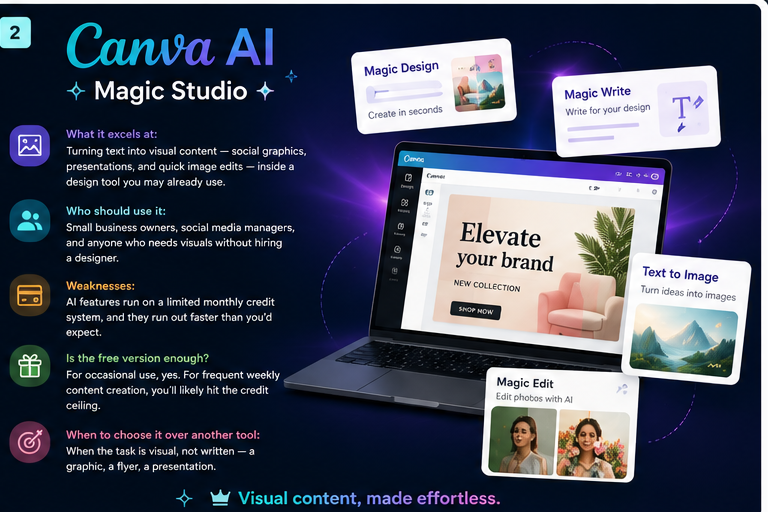
What it excels at: Turning text into visual content — social graphics, presentations, and quick image edits — inside a design tool you may already use.
Who should use it: Small business owners, social media managers, and anyone who needs visuals without hiring a designer.
Weaknesses: AI features run on a limited monthly credit system, and they run out faster than you'd expect.
Is the free version enough? For occasional use, yes. For frequent weekly content creation, you'll likely hit the credit ceiling.
When to choose it over another tool: When the task is visual, not written — a graphic, a flyer, a presentation.

What it excels at: Quick chat-based help through the free Copilot app, and (with the right Microsoft 365 plan) assistance inside Word, Excel, and Outlook.
Who should use it: People already working inside Microsoft 365 for their job.
Weaknesses: The deeper integration into Word, Excel, and PowerPoint increasingly requires a paid Microsoft 365 add-on, so what's actually free depends heavily on your specific plan.
Is the free version enough? For basic chat, yes. For AI features inside your actual Office documents, check your plan first.
When to choose it over another tool: When your entire workday already happens inside Microsoft Office.
Beginner Toolkit Comparison Table
Tool | Best For | Free Plan Worth Using? | Biggest Weakness |
Claude | Long writing, detailed instructions, coding | Yes | Smaller tutorial ecosystem |
ChatGPT | General all-purpose flexibility | Yes | Usage caps interrupt heavy sessions |
Gemini | Google Workspace users | Yes | Daily caps on research-heavy use |
Perplexity | Research with sources | Yes, unlimited basic search | Not built for creative writing |
Canva AI | Visual content and design | Somewhat, credits run out fast | Limited monthly AI credits |
Copilot | Microsoft 365 users | Yes for basic chat only | Deeper Office AI often needs a paid add-on |
Practical starting advice: if you're not sure where to begin, pick either Claude or ChatGPT as your one main tool. Both are flexible enough to handle the vast majority of what a beginner needs, and you can always add a second, more specialized tool later once you know what you're actually missing.
Your First Five Things to Try

Reading about AI only gets you so far. The fastest way to actually get comfortable with it is to open a chatbot and try a few low-stakes tasks. Here are seven simple exercises to build your confidence.
1. Summarize an Article
Paste in a long article and ask for a short summary. This shows you immediately how AI handles real information, and it's genuinely useful any time you're short on time but need the gist of something.
Why it's useful: You'll see firsthand how AI condenses information, which builds trust (or healthy skepticism) fast.
2. Plan a Vacation
Ask for a rough daily itinerary for a trip you've been considering. You'll get a solid starting draft in seconds instead of twenty open browser tabs.
Why it's useful: It demonstrates how AI organizes and structures information, which is one of its core strengths.
3. Rewrite an Email
Take an email you've already drafted and ask AI to make it either more formal or more casual. Comparing the before and after is a fast way to understand how much tone matters in your prompt.
Why it's useful: This is one of the most common real-world uses of AI, and it's low-risk since you're just tweaking your own words.
4. Brainstorm Dinner Recipes
Tell it what's in your fridge and ask for three dinner ideas. It's a genuinely practical, everyday task that shows AI's usefulness outside of "work" contexts.
Why it's useful: It reinforces that AI isn't just a professional tool — it fits into ordinary daily decisions too.
5. Learn a New Topic
Pick something you're curious about but don't understand well, and ask for a beginner-friendly explanation with a real-world example.
Why it's useful: This shows you AI's strength as a patient, judgment-free explainer, which is genuinely one of its best everyday uses.
6. Create a Simple Workout Plan
Describe your fitness level and how much time you have, and ask for a basic weekly workout plan.
Why it's useful: It's a good test of how well AI can personalize an answer based on details you provide, rather than giving a generic response.
7. Translate Something
Paste in a sentence or short paragraph and ask for a translation into another language.
Why it's useful: Translation is fast, immediately useful, and a good way to see AI handle a very specific, well-defined task accurately.
Tip: Try all seven of these in one sitting if you can. It only takes about twenty minutes total, and by the end, AI will feel a lot less abstract and a lot more like a tool you already know how to use.
How to Write Better Prompts

A "prompt" is just what you type into an AI chatbot. There's no special formatting or code required — it's plain English, the same way you'd text a friend. But a few small habits make a genuinely big difference in the quality of what you get back.
Give Context
AI doesn't know anything about your specific situation unless you tell it. A sentence of background changes everything.
Before: "Help me write a cover letter."
After: "Help me write a cover letter for a marketing coordinator role at a small nonprofit. I have three years of social media experience and no formal marketing degree."
Explain Your Goal
Be specific about what you actually want the response to accomplish, not just the general topic.
Before: "Tell me about budgeting."
After: "Explain three simple budgeting methods for someone who's never tracked their spending before."
Specify Tone
Naming the tone directly is far more reliable than hoping the AI guesses correctly.
Before: "Write a birthday message for my coworker."
After: "Write a short, funny birthday message for a coworker I'm friendly with, nothing too formal."
Mention Your Audience
Who's going to read or use this? Tone and complexity should shift depending on the answer.
Before: "Explain how compound interest works."
After: "Explain how compound interest works to a teenager who's never had a savings account."
State the Format
If you want a list, a table, a short paragraph, or a script, say so directly.
Before: "Give me ideas for a birthday party."
After: "Give me 5 birthday party ideas as a numbered list, each with a one-sentence description."
Request Revisions
Treat the first response as a draft, not a final answer. If it's not quite right, just say so.
Example follow-up: "This is good, but can you make it shorter and a little less formal?"
A Full Before-and-After Example

Before: "Write something for my Instagram about my coffee shop."
After: "Write a short, warm Instagram caption for my small coffee shop announcing a new fall menu. Keep it under 40 words, casual tone, and end with a simple call to action to stop by this week."
The second version gives the AI a goal, a tone, a length, and a specific detail to work with — and that's exactly why it produces something usable on the first try instead of something generic you'll need to rewrite anyway.
The Biggest Beginner Mistakes

Almost everyone makes these same mistakes when they first start using AI. Here's how to skip past them faster.
Expecting perfection on the first try. AI responses are a starting point, not a finished product. Treat the first answer like a rough draft from a fast, capable assistant — good, but almost always worth refining.
Using one-sentence prompts and expecting detailed results. A vague question gets a vague answer. The fix is simple: add context, goal, tone, and format, as covered in the section above.
Trusting AI blindly. AI can state something incorrect with total confidence, which makes it easy to trust without checking. Treat factual claims, statistics, and quotes as things to verify, especially for anything important.
Never fact-checking. This is closely related to the mistake above, but worth calling out separately: always double-check numbers, dates, and specific claims before using them in something that matters, like a work report or an application.
Giving up after one bad answer. If a response misses the mark, that's not a dead end — it's a cue to add more detail or ask for a revision. Most beginners quit right when a little more effort would have gotten them a genuinely useful answer.
Trying too many tools at once. Signing up for five different AI apps in one week is a fast way to feel overwhelmed all over again. Stick with one tool for two weeks of real use before considering a second.
Ignoring follow-up questions. Sometimes AI will ask you a clarifying question before giving a full answer. Answering it, rather than skipping past it, usually gets you a much more useful and personalized result.
How AI Fits Into Everyday Life

AI isn't just for tech workers or big companies. Here's how it fits into a range of everyday situations.
Students
Turning notes into flashcards, getting a plain-language explanation of a confusing concept, or generating practice quiz questions before an exam. Example: "Turn these biology notes into 10 quiz questions with answers underneath."
Office Workers
Drafting emails, summarizing meeting notes, and turning a messy set of bullet points into a structured report. Example: "Summarize this meeting transcript into Key Decisions, Action Items, and Open Questions."
Business Owners
Brainstorming marketing ideas, writing product descriptions, or getting a quick SWOT analysis of a new business idea. Example: "Suggest three marketing channels for a small bakery with a $300/month budget."
Freelancers
Drafting client proposals, organizing project notes, and getting quick feedback on a piece of writing before sending it off. Example: "Review this proposal draft and suggest three ways to make it more persuasive."
Content Creators
Brainstorming video or blog topics, writing captions, and outlining scripts. Example: "Give me 10 YouTube video ideas about home organization, mixing practical and fun angles."
Parents
Planning meals, organizing a family schedule, or getting quick, age-appropriate explanations for a curious kid's question. Example: "Explain why the sky is blue in a way a 7-year-old would understand."
Job Seekers
Tailoring a resume to a specific job posting, practicing interview questions, or drafting a cover letter. Example: "Give me 5 likely interview questions for a customer service role, with a tip for answering each one well."
Developers
Debugging code, explaining an unfamiliar function, or getting a second opinion on a technical approach before building it. Example: "Explain what this error message means and suggest two possible fixes."
No matter which category you fall into, the theme is the same: AI works best on a specific, real task you already need to do, not as some abstract concept you're trying to "learn" in isolation.
Creating Your First AI Workflow

Once you're comfortable using one tool for individual tasks, the next step is combining tools for a bigger project. Here's a simple example workflow for creating a piece of content from scratch.
Idea → Claude for brainstorming → ChatGPT for rewriting and polishing → Canva AI for the visual → Grammarly for a final grammar check → Publish
Here's why combining tools like this works well: each one is doing the specific part it's genuinely good at, instead of forcing a single tool to handle everything from research to design.
Claude tends to be strong for the early, thoughtful brainstorming and structuring stage.
ChatGPT is a flexible option for a quick second pass or a different stylistic angle.
Canva AI turns the finished text into a visual you can actually publish.
Grammarly catches typos and tone issues right before you hit publish.
You don't need this exact workflow. The point is the pattern: use the right tool for each specific step, rather than expecting one app to do the whole job alone. As you get more comfortable, you'll naturally develop your own version of this chain based on the tasks you actually repeat every week.
Tip: Write your workflow down somewhere, even just a simple note. Once you find a sequence that works for a task you do often, reusing it consistently is what actually saves you time — not constantly experimenting with new combinations.
Frequently Asked Questions

Is AI free? Yes, for the most part. ChatGPT, Claude, Gemini, and Perplexity all have genuinely usable free plans. Paid tiers mainly raise usage limits and unlock extra features, but you can get real value without paying anything.
Will AI replace my job? For most jobs, AI is more likely to change parts of how you work than replace the job entirely. It tends to handle repetitive, time-consuming tasks well, which frees you up for the parts of your job that need human judgment, relationships, or creativity.
What's the difference between Claude and ChatGPT? Claude tends to be strong with long documents, detailed instructions, and careful writing. ChatGPT is a more flexible all-rounder with a larger ecosystem of plugins and integrations. Many regular users end up using both for different tasks.
Can AI browse the internet? Some tools can, if web search is turned on. Perplexity is built specifically around live web search with citations. ChatGPT, Claude, and Gemini also support web search, though it's worth confirming a tool actually searched rather than assuming it did for time-sensitive questions.
Do I need to learn coding to use AI? No. Everyday AI chatbots are designed to be used in plain, conversational language. Coding knowledge only matters if you want to build your own AI-powered applications, which is a completely different, more advanced use case.
Is AI safe to use? Generally yes for everyday tasks like writing and brainstorming. Be cautious about pasting sensitive personal or company information into a public AI tool, and always verify any factual claims before relying on them for something important.
Can AI write essays for me? It can, but for school assignments, check your institution's academic integrity policy first. Many schools consider submitting AI-generated work as your own a violation, even if the tool made it easy to do.
How accurate is AI? It's generally strong for well-established, non-controversial information, but it can occasionally state something incorrect with full confidence. Treat factual claims, statistics, and quotes as things to verify rather than facts to trust outright.
Which AI tool should a total beginner start with? ChatGPT or Claude are the easiest entry points because they're free, flexible, and don't require any technical setup beyond creating an account.
Can I use more than one AI tool at a time? Yes, and plenty of people do. Using different tools for their specific strengths — like Perplexity for research and Claude for writing — is a completely normal way to work once you're comfortable with the basics.
Does AI remember what I've told it before? It depends on the tool and your settings. Many chatbots now offer memory features that carry relevant details across conversations, though you can usually review or turn this off if you'd rather each conversation start fresh.
What happens if I ask AI something it gets wrong? Just correct it and ask again, or provide more context. AI chatbots respond well to follow-up clarification, and treating a wrong answer as a starting point rather than a failure will get you to a better result quickly.
Final Thoughts

You don't need to master every AI tool out there, and you definitely don't need to figure it all out this week. The people who get real, lasting value out of AI aren't the ones with the most apps installed — they're the ones who picked one tool, actually used it consistently, and slowly got comfortable with it over a few weeks of real tasks.
Start with one tool. Try the seven exercises in this guide. Pay attention to which tasks it actually saves you time on, and build from there. Consistency beats complexity every time, especially when you're just getting started.
If you're ready to go deeper, Software Junkie Hub has plenty of other beginner-friendly AI tutorials to explore next — from writing better prompts to comparing specific tools in detail. Take it one guide, and one tool, at a time.



Comments